

 HANDS ON SharePoint
 HANDS ON Teams
 HANDS ON Lists
 HANDS ON tek
 M365 Admin
Hands-On Microsoft 365 Pulse – Weekly Updates (Week 12)
I’m writing this week’s Pulse from Redmond, on the Microsoft campus, where I’m attending the MVP Summit. Today is also my birthday, and it’s one of those moments that lands as both a privilege and a tradeoff. I’m excited to be here with this community, but I’d be lying if I said it isn’t a bit bittersweet not being at home with my family.
The Summit is hard to explain without it sounding like hype, so I will keep it simple. It is a week where Microsoft and the community are in the same loop. Product groups share where things are going, and MVPs push back with the reality of implementation. That combination is what makes this worth the travel.
I will not be able to share everything I’m learning right away. Sessions are confidential and are simply not meant to be repeated outside the room. But it still matters, because it makes me better at what I do when I’m back at work, and it shapes the way I filter and explain the constant stream of updates that you see in this Pulse.

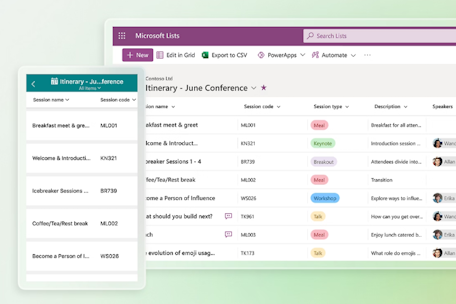
From the batch of updates from the past week, two caught my eye. The first is Lists as a knowledge source for agents in SharePoint and OneDrive, where Microsoft Lists becomes a supported knowledge source for custom agents in SharePoint and OneDrive, so an agent can answer questions using list items and metadata, based on the same permissions the user already has. The second is Digital signage support for Teams Rooms panels, which lets you display digital signage on idle Teams panel devices, with the signage source and settings configured in the Pro Management portal, and available with Teams Rooms Pro or shared space licensed spaces.

As always, there’s a bunch more to explore — check out the full list below. Let me know in the comments what your favorite update was this week, or what you’re hoping to see next. I’m curious to hear what caught your eye!
SharePoint
Whiteboards created in Teams channels will now be stored in SharePoint
Publishing InfoPath Forms in SharePoint Online will not be allowed for all tenants
Lists as a knowledge source for agents in SharePoint and OneDrive
SharePoint Advanced Management: Site admin control for restricted content discovery
Dynamics 365 Customer Service
Dynamics 365 Customer Service – Control evaluation volume with sampling
Dynamics 365 Customer Service – Define critical questions in evaluation criteria
Dynamics 365 Sales
Dynamics 365 Sales – Get additional Dataverse storage capacity
Dynamics 365 Sales – Modern, in-flow email template picker for Sequences
Dynamics 365 Sales – Improve opportunity context with AI-based data enrichment
Microsoft 365 Apps
Updates available for Microsoft 365 Apps for Current Channel
Microsoft 365 Copilot
Microsoft 365 Copilot: Upload local files now supports .eml and .msg file types
Microsoft 365 Copilot: Introducing Federated Copilot Connectors
New admin control for AI‑generated code previews in Microsoft 365 Copilot Pages
Frontier Admin Control: Single enrollment across all apps, platforms, and agents
Copilot Notebooks: New features coming to Frontier Public
Microsoft Copilot (Microsoft 365)
Microsoft Copilot (Microsoft 365): Intelligent Summaries in Copilot Dashboard
Microsoft Copilot (Microsoft 365): Intelligent Summaries in Copilot Dashboard
Microsoft Copilot (Microsoft 365): Create Word documents from Copilot Notebooks
Microsoft Copilot (Microsoft 365): Create PowerPoint presentations from Copilot Notebooks
Microsoft Copilot (Microsoft 365): Create interactive visuals in Copilot Pages
Microsoft Copilot Studio
Microsoft Copilot Studio – Read only Analytics Viewer role
Microsoft Dataverse
Microsoft Dataverse – Use AI functions to enhance data quality
Microsoft Defender for Cloud Apps
Upcoming retirement of select threat detections in Microsoft Defender for Cloud Apps
Microsoft Edge
Microsoft Edge: Security Update Alerts in the Edge management service
Microsoft Edge for Business: Cross-tenant support using Intune Mobile Application Management (MAM)
Microsoft Entra
Microsoft Entra: Passkeys in Microsoft registration campaigns
Microsoft Fabric
Changes to OneLake operation reporting in Microsoft Fabric
Microsoft Purview
Microsoft Purview: Information Protection – Policy sync status for M365 Label publishing policies
Microsoft Purview: Information Protection – Policy sync status for M365 Label publishing policies
Microsoft Purview: eDiscovery – review set limit increase
Microsoft Purview | Data Security Triage Agent Summaries for DLP Alerts in Microsoft Defender XDR
Microsoft Purview: Endpoint Data Loss Prevention – Endpoint DLP Device Status API
Microsoft Purview: Data Security Investigations – analyze files tied to endpoint DLP alerts
Microsoft Purview: Data Lifecycle Management – DLM Retention support Microsoft Teams call logs
Microsoft Purview: Credential scanning in Data Security Posture Agent
Microsoft Purview: Data Security Investigations – analyze files tied to audit log activities
Microsoft Purview: Data Security Investigations – role-based access simplification
Microsoft Purview: Information Protection – Sensitivity label support in Engage
Microsoft Purview: Endpoint Data Loss Prevention – Device Health Reporting Dashboard
Microsoft Teams
Microsoft Teams: Manage multiple phone numbers within one Teams account
Microsoft Teams: New slash command in compose to create workflows
Microsoft Teams for Mac: Improved access to account management
Microsoft Teams: Standardized preview experience for Word, PowerPoint, and Excel files
Microsoft Teams: Recently used emojis sync across devices
Microsoft Teams: Digital signage support for Teams panels
Microsoft Teams: Attendee capacity packs for Teams events
Microsoft Viva
Microsoft Viva: Modernized content composition experience in Engage
Fix/Update: Delete Attribute feature in Viva Glint temporarily unavailable
OneDrive
Improved OneDrive sync experience for macOS users
Outlook
Outlook: Multiselect in the New Outlook and Teams calendars
Outlook: Improved handling of disallowed and failed email reactions
Outlook: Font Improvements in Outlook for Android
Offline attachments policy for the new Outlook for Windows
Planner
Planner: Microsoft Planner tab support for shared and private channels in Microsoft Teams
Power Apps
Power Apps – Download wrapped apps directly from Dataverse
Power Apps – Custom theming for model-driven apps is becoming generally available
Power Apps – Use Microsoft 365 Copilot in model-driven apps
Power Automate
Power Automate – Share Process license capacity across workflows
Power Platform
Power Platform – Information regarding the end of support for Global Discovery Service (GDS) API
Power Platform admin center – New alert metrics available in the Monitor section
Windows
Out-of-band hotpatch update released to address an issue affecting Bluetooth device visibility






No comments yet