

 HANDS ON SharePoint
 HANDS ON Teams
 HANDS ON Lists
 HANDS ON tek
 M365 Admin
Hands-On Microsoft 365 Pulse – Weekly Updates (Week 39)
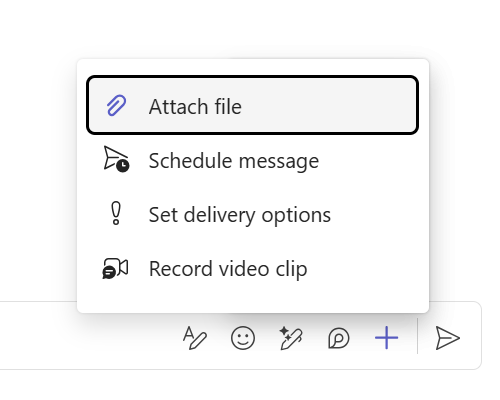
This week, I want to highlight a small but mighty feature in Microsoft Teams that’s now available worldwide. If you work with external users, you’ll know the pain of sharing files. Until now, you had to upload them to OneDrive or—worse—resort to unauthorized platforms. That’s no longer the case. You can now attach files directly in chats with external users, saving time and avoiding frustration. It’s not a brand-new announcement, but its global rollout makes it worth sharing.
On the broader Microsoft 365 front, the standout update for me is the arrival of Claude in Copilot. It’s exciting to see model choice becoming a reality—currently available in Copilot Studio and the Researcher agent.
And for all the SharePoint developers out there: Microsoft just updated their plans—SPFx Field Customizers are here to stay (at least for now). The earlier idea to retire them in favor of JSON column formatting has been shelved. Column Formatting is still great for simpler scenarios, but if you need advanced logic like API calls, SPFx is still your friend.

Each week, I spotlight the most impactful updates across Microsoft 365—whether it’s a major feature release, a hidden gem from the roadmap, or a deep dive into how you can make the most of these tools. From Microsoft Teams enhancements that boost collaboration to SharePoint improvements for better content management and Copilot innovations that bring AI into your workflow, these highlights are designed to help you stay ahead and work smarter. Whenever possible, I’ll also share links to my latest blog posts for practical tips and hands-on guidance.


Microsoft 365 Roadmap & Message Center Updates
Stay on top of the latest Microsoft 365 updates and announcements with this weekly digest.
I track daily changes from the Microsoft 365 Roadmap and Message Center so you don’t have to.
This recap brings together all the key updates from the past week—plus anything important you might have missed—so you’re always up to date.
SharePoint
(Updated) Support Update for SharePoint Framework Field Customizers in Lists and Document Libraries
Microsoft Teams
Microsoft Teams: New link in forwarded messages improves context and traceability
Microsoft Teams: Cloud IntelliFrame now available on Teams Rooms for Android
Microsoft Teams: Apps in Shared Channels for Microsoft Teams
Microsoft Teams | Admin control to hide Teams call history in iOS native dialer
Microsoft Teams: Emojis in Section Names
Microsoft Teams: Pop out meeting window on iPad
Microsoft Teams Rooms
Microsoft Teams Rooms on Android: Town hall attendee experience
Microsoft Copilot (Microsoft 365)
Microsoft Copilot (Microsoft 365): Updates to Memory and Personalization in Microsoft 365 Copilot
Microsoft Copilot (Microsoft 365): Meetings search using categories added in Outlook
[Copilot Chat] Upload multiple reference images to create new images
Microsoft 365 Copilot: Updates to memory and personalization
Microsoft 365 Copilot Researcher and Microsoft Copilot Studio: Expanding model choice
Microsoft Purview Compliance Portal
Microsoft Purview compliance portal: Unique Counting of EDM Matches
Microsoft OneNote
Microsoft OneNote | Sensitivity labels now available on desktop, web, iOS, Android, and Mac
Power Platform
Power Automate
Power Automate – Quantify time and money savings delivered by automations
Dynamics 365 Sales
Dynamics 365 Sales – Find, filter, and sort using natural language with smart grid
Dynamics 365 Sales – Boost pipeline by autonomously researching leads with Sales Qualification Agent
Microsoft Fabric
Microsoft Fabric: Upcoming tenant settings for OneLake diagnostic logs
Microsoft 365
Microsoft 365: Organizational data ingestion – new updates
Microsoft 365: PAYGO consumption-based meter for your extra SharePoint storage needs
Microsoft 365: Department Billing for Microsoft 365 Backup
NEW Microsoft 365 companion apps: a suite designed to enhance productivity
Updates available for Microsoft 365 Apps for Current Channel
Microsoft Outlook
Microsoft Outlook: New third-party enriched properties available for customizing profile cards
Microsoft Exchange Online
Microsoft Exchange Online | SMTP onboarding to App RBAC
Viva Glint
Microsoft Viva Glint: User schema enhancements with custom age and tenure derivations
Viva Engage
Viva Engage: Mute a conversation from Teams for iOS
Related questions now available in Viva Engage for Teams on iOS
Microsoft Viva: Flexible targeting of Storyline Announcements
Viva Pulse
Microsoft Viva Pulse: Updates to data retention policy
Microsoft 365 Admin Center
Microsoft 365 Admin Center: Authoritative content management for Microsoft 365 Copilot Search
Microsoft admin center: New licensing experiences
Microsoft Edge
Microsoft Edge: Adding protection against malicious sideloaded extensions
Microsoft Education
Retirement Announcement: Microsoft Education Learning Tools Interoperability (LTI) Integrations
Windows
The September 2025 Windows non-security preview update is now available for Windows 11, version 23H2
The September 2025 Windows non-security preview update is now available for Windows 10, version 22H2
Frequently asked questions about the Secure Boot update process
Prefer to get these updates delivered straight to your inbox?
Subscribe to the Hands-On Microsoft 365 Weekly Newsletter and never miss a thing: Subscribe here.






No comments yet