

 HANDS ON SharePoint
 HANDS ON Teams
 HANDS ON Lists
 HANDS ON tek
 M365 Admin
Hands-On Microsoft 365 Pulse – Weekly Updates (Week 46)
Ignite week is on. Microsoft is in San Francisco and we’re about to see a crazy amount of Microsoft 365 updates dropping fast. Before the floodgates open, here’s a quick warm‑up with my highlights from last week.
My SharePoint highlights (you know this is a dear topic for me):
-
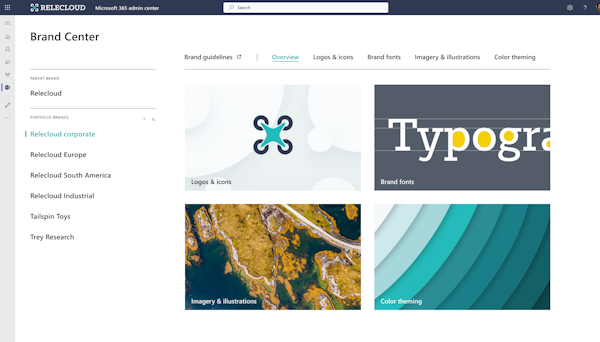
Branding governance via PowerShell — Tenant admins can now centrally manage site branding. Enforce enterprise themes, block custom branding on selected sites, and audit changes. Consistency and governance finally come together without manual policing.
-
Official dark themes for SharePoint — Two Microsoft-designed dark themes land out of the box. Accessible, comfortable in low-light, and consistent with Microsoft’s design system. A simple win for look + usability.

On the Teams front:
-
Miracast comes to Teams Rooms on Windows — Wireless content sharing gets easier in meeting spaces. It sits alongside Teams Cast and HDMI ingest, works with touch boards, and is exclusive to Teams Rooms Pro.

As always, there’s a bunch more to explore — check out the full list below. Let me know in the comments what your favorite update was this week, or what you’re hoping to see next. I’m curious to hear what caught your eye!
Copilot
Microsoft 365 Copilot: Configure connected agents for Researcher and other agents
Microsoft 365 Copilot: People agent now available in Frontier
Microsoft Copilot (Microsoft 365): Agent Mode in Excel
Microsoft Copilot (Microsoft 365): Use Copilot with OneDrive files in Finder
Copilot can now automatically reschedule 1:1 meetings and personal events based on your preferences
Copilot in Microsoft OneNote for Windows Desktop Update
Microsoft 365 Copilot: Copilot integration for OneDrive files in macOS Finder
Decoupling admin controls for agents on/off from Researcher and Analyst
Dynamics 365
Dynamics 365 Contact Center – Improve real-time analytics with intent group and agent groups
Excel
Agent mode in Excel generally available soon (formerly part of the Frontier program)
Loop
Loop app grace period is ending
Microsoft 365
Book a workspace when creating an event
Migration of Name Pronunciation and Pronoun Controls to the People Settings Section in Org Settings
Microsoft 365 admin center: New Admin Control for Turning off People Skills
Announcing the new pay-as-you-go experience in Microsoft 365 Admin Center
Microsoft Copilot Studio
Microsoft Copilot Studio – Removal of the Insights widget from analytics page
Microsoft Defender
Microsoft Defender for O365: New email actions available in Advanced Hunting
Microsoft Defender for Office 365: Teams protection capabilities to Defender for Office Plan 1
Microsoft Edge
Microsoft Edge: New WebGL software backend
Microsoft Entra
Microsoft Entra: Cross-tenant security group synchronization
Microsoft Purview
Microsoft Purview: Insider Risk Management-Priority content support for Risky AI usage
Outlook
Microsoft Outlook for iOS/Android: Automatic replies collapsed by default in email thread
New Dedicated Copilot Chat Button in Outlook for Android
Outlook: Updated Copilot Button for Android
Outlook: Hide Declined Meetings in Outlook Mobile
Power Automate
Power Automate – Enable process mining integration in process map
Power Platform
Power Platform – Upcoming enforcement of tenant isolation
SharePoint
Legacy SharePoint Online Content Delivery Network (CDN) domain to be retired—review configurations
SharePoint: Site Branding Governance via PowerShell
SharePoint: Microsoft designed dark themes for SharePoint Sites
SharePoint branding governance via PowerShell
Teams
Maintain accurate presence in Teams on the Web with new activity detection setting
Microsoft Teams: Upcoming improvements to the jump list experience on Windows
Microsoft Teams: Tenant-Owned Domain Impersonation Protection for Teams Messaging
Microsoft Teams: Channel Agent Feature Updates
Microsoft Teams: Improvements to “Activity in other accounts and orgs panel”
Microsoft Teams frontline BYOD onboarding wizard
New customer onboarding for Google and Microsoft Teams calendar sync paused
Microsoft Teams: VDI optimization monitoring in Best practice configurations dashboard
Microsoft Teams: Enhancements to Interpreter and multilingual meeting experience
Microsoft Teams: Miracast support for Teams Rooms on Windows (Teams Rooms Pro only)
Viva Engage
Viva Engage: Update storyline cover photos in Teams for iOS
Windows
Windows 11, version 23H2 (Home and Pro editions) has reached end of servicing
Windows Autopatch for the US government: How to get started
Take Action: Out-of-band update to address ESU enrollment issue on Windows 10, version 22H2 devices






No comments yet