

 HANDS ON SharePoint
 HANDS ON Teams
 HANDS ON Lists
 HANDS ON tek
 M365 Admin
What’s new for Copilot – February 2026
After a relatively quiet month, Copilot is back in full swing. February brought updates across almost every Microsoft 365 app, and the pace feels familiar again.
As in previous roundups, I’m focusing on the smaller changes that actually make a difference. One of them is the ability to turn Copilot Pages into SharePoint news posts, making it easier to take AI‑generated content, refine it, and publish it where it belongs. Another is the unification of grounding tools and sources under a single plus menu in Copilot Chat, a subtle change that reduces friction for everyday use.
On the admin side, branding Copilot helps reinforce that users are working inside a trusted organizational space. There’s more to cover this month, but these updates already show how Copilot is quietly becoming easier, clearer, and more practical to use.
FEB
3
Microsoft 365 Copilot will allow users with a Copilot license to copy AI-generated tables from Chat into documents and apps starting early March 2026. The feature is enabled by default, requires no admin action, and has no compliance concerns identified.
We’re simplifying the Input Box in Copilot Chat by bringing together various user actions under the Plus menu (+). The unified Plus menu (+) will continue to allow users to add content to prompts, while also letting them access tools/agents and manage data sources used to ground Copilot.
Users can now copy tables created in Copilot. Leverage Copilot to make your content better and use it anywhere you need to.
FEB
4
Copilot Search can now match on a person’s department, and you can find/lookup all people in a given department when searching the people source directly.
FEB
5
Microsoft 365 Copilot will introduce a unified plus (+) menu by late February 2026, consolidating grounding, tools, and sources into one menu for easier access. This change affects Copilot Chat and Microsoft 365 Copilot users, is enabled by default, requires no admin action, and improves workflow and discoverability.
Starting late March 2026, Microsoft 365 Copilot license requests will include an optional business justification field for users. Admins will see this justification during review to streamline approvals. The feature is on by default, requires no tenant configuration, and does not affect existing workflows or policies.

Shared mailbox users and delegates with full access permission will now be able to access Copilot Chat, directly from their shared and delegate mailboxes in new Outlook.
Researcher will be available for Microsoft 365 business and enterprise users with a Microsoft 365 Copilot add-on license. Researcher is an advanced deep reasoning agent in Microsoft 365 Copilot designed to tackle complex, multi-step tasks by acting as a deep research assistant.
Copilot Chat in Outlook expanding to support reasoning over a user’s entire inbox, calendar and other enterprise data for Microsoft 365 Copilot Chat users (without a Microsoft 365 Copilot license) .
FEB
6
Discover and find people through Microsoft 365 Copilot Search based on your company’s custom profile properties from SharePoint Online.
Admins can govern and manage federated copilot connectors in Microsoft 365 admin center. #copilotcontrolsystem
Now Copilot Search can return matching people for your broader people search queries. Allowing you to discover, disambiguate, and explore known and new people to contact. Discover Whether you’re looking for people with a specific skill like “Project leadership” or “Artificial Intelligence” Copilot Search can help you explore potential contacts through the People data source. Disambiguate When there are multiple people matching in exact name, email, or alias Copilot Search will help you disambiguate through a new carousel on the main results page alongside other relevant results.
FEB
9
Flexible layouts and rich UX components will enable makers to build highly expressive agents, ultimately driving increased user engagement and virality.
With a Microsoft365 Copilot license, Copilot AI-generated video projects have improved audio with realistic AI voiceover, professional sound effects, and enhanced audio mixing.
Microsoft 365 Copilot’s “Prepare for a meeting” feature is coming to classic Outlook for Windows for licensed users, providing meeting context from emails, documents, and tasks via the Calendar. Rollout starts January 2026, with no admin changes required; users need an active Copilot license.

Microsoft 365 Copilot in classic Outlook for Windows will enable users with a Copilot license to schedule meetings via a new “Schedule with Copilot” option, automating availability checks, room booking, agenda drafting, and invitations. Public preview starts late January 2026; general availability begins early March 2026.

FEB
10
We are announcing the ability to use custom instructions for Microsoft Copilot ask a question in Dynamics 365 – Customer Service. This feature will reach general availability on February 28, 2026.
We are announcing the ability to use enhanced verbatim responses for Microsoft Copilot ask a question in Dynamics 365 – Customer Service. This feature will reach general availability on February 28, 2026.
Microsoft Forms will integrate Microsoft 365 Copilot Chat and Surveys Agent by March 2026, providing AI-driven form creation, editing, and analysis tools for licensed users. Features include AI suggestions, invitation drafting, and data insights, enabled by default with existing Copilot policies and no required admin action.
FEB
11
Starting mid-February 2026, the Microsoft 365 apps for Mac suite installer will include a shim for the Microsoft 365 Copilot app, enabling users to download the full Copilot app easily. Existing installations remain unaffected; organizations must ensure deployment includes the shim and meets macOS 14.0 requirements.

You can now reference SharePoint libraries and OneDrive folders when creating a presentation with Copilot using Agent Mode in PowerPoint.
You can now reference an email when creating a presentation with Copilot in PowerPoint using Agent Mode.
You can now reference a Teams meeting or chat when creating a presentation with Agent Mode in PowerPoint.
Now with Agent Mode in PowerPoint, you can create presentations based on your Work IQ. Build rich presentations without the heavy lift of finding all the right files, meetings, and emails to compose relevant slides.
Now with Agent Mode in Copilot in PowerPoint, you can create presentations based on your Work IQ. Build rich presentations without the heavy lift of finding all the right files, meetings, and emails to compose relevant slides.
Generate an Executive Summary slide for your presentation with Agent Mode in PowerPoint. Copilot delivers a polished draft that highlights your key points and provides a clear, executive ready summary.
You can now reference an image when creating a presentation with Copilot using Agent Mode in PowerPoint.
FEB
12
Agent Mode in PowerPoint lets you create, edit, and refine presentations through natural conversation, directly in your presentation. You can start a new presentation or build on an existing one, asking Copilot to generate slides, update content, improve layouts, and polish design—while preserving formatting, structure, and branding. Copilot uses your files, meetings, emails, and more to help shape content and iterate quickly, and it connects to your brand kit so you can apply branded templates, insert brand approved images, and check for brand compliance. Available to Microsoft 365 Copilot–licensed users.
We’re excited to bring M365 Copilot in OneDrive, a new unified Copilot chat experience designed to make working with your files simpler, smarter, and more seamless across Microsoft 365.
Generate an Executive Summary slide for your presentation with Agent Mode in PowerPoint. Copilot delivers a polished draft that highlights your key points and provides a clear, executive ready summary.
Agent Mode in PowerPoint lets you create, edit, and refine presentations through natural conversation, directly in your presentation. You can start a new presentation or build on an existing one, asking Copilot to generate slides, update content, improve layouts, and polish design—while preserving formatting, structure, and branding. Copilot uses your files, meetings, emails, and more to help shape content and iterate quickly, and it connects to your brand kit so you can apply branded templates, insert brand‑approved images, and check for brand compliance. Available to Microsoft 365 Copilot–licensed users.
Microsoft 365 Copilot and Copilot Chat will update entity inserts from Add Work Content so entity names no longer appear as text in the input box, enabling cleaner prompts. This change rolls out worldwide from mid to late February 2026, is enabled by default, and requires no admin action.

FEB
13
The Microsoft Purview Data Loss Prevention policy to restrict Microsoft 365 Copilot processing sensitive files in Word, Excel, and PowerPoint will now apply regardless of file storage location.
We are announcing the ability to engage prospects faster with Sales Agent-enriched leads in Microsoft 365 Copilot for Sales. This feature will reach general availability on February 27, 2026.
FEB
16
Infinite scroll enables users to continuously browse older chat sessions by automatically loading additional conversations as they scroll. This creates a smoother, more modern chat history experience
See a list of users with high Copilot pay-as-you-go usage (i.e., greater than 2000 credits). You can buy and assign Copilot licenses to the high-usage users directly on this page.
FEB
18
When creating a presentation with Copilot in PowerPoint using Agent Mode, you can reference an existing PowerPoint file, so Copilot applies its theme and styles to the new deck, keeping the design consistent.
This feature introduces admin controls for managing Anthropic as a model provider for specific users and groups in the tenant.
When creating a presentation with Copilot in PowerPoint using Agent Mode, you can reference an existing PowerPoint file, so Copilot applies its theme and styles to the new deck, keeping formatting consistent.
Customers can submit their custom Copilot agents built in Agent Builder to the Agent Store under the “Built by your org” section, after admin review and approval in M365 Admin Center. This governed flow enables admins to review, approve, and publish submitted agents so that they can be discovered and used by others in the Agent Store. This helps organizations share validated agents at scale while maintaining quality and governance.
When creating a presentation with Copilot in PowerPoint using Agent Mode, you can reference an existing PowerPoint file, so Copilot applies its theme and styles to the new deck, keeping formatting consistent.
FEB
19
Use a prepaid capacity pack as the sole billing method for supported Copilot experiences. Admins can configure billing policies with prepaid capacity such that usage for users in the policy is deducted exclusively from prepaid capacity credits, with no pay as you go charges.
DLP policies will block Microsoft 365 Copilot from processing sensitivity-labeled Word, Excel, and PowerPoint files across all storage locations, including local devices. This rollout begins late March 2026, requires no policy changes, and ensures consistent DLP enforcement without altering Copilot capabilities.
FEB
20
Extending support for modern Excel workbooks stored on your device to Agent Mode in Excel, giving users the flexibility to use multi-step editing capabilities with Copilot in Excel no matter whether files are stored locally or in the cloud.
FEB
23
The updated Copilot adoption Power BI report will come with a streamlined UX and new Power user insights.
This feature enhances the PowerPoint Live meeting experience by using Copilot to let attendees select slide text and get explanations for the content.
Microsoft 365 Copilot will allow users to search for and insert SharePoint Lists into chat prompts via Context IQ, enhancing response accuracy. This feature, enabled by default, rolls out worldwide from late March to early April 2026 and requires a Copilot license with no admin action needed.

FEB
24
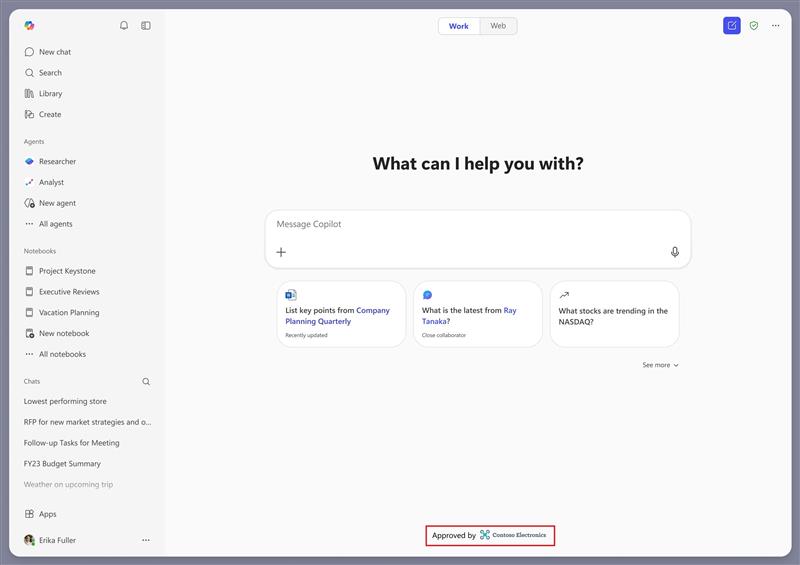
This update introduces a co-branding experience in the Microsoft 365 Copilot app that helps organizations present an admin approved visual identifier directly within the Chat screen. Specifically, the experience enables administrators to leverage the organization-supported logo already managed in the Microsoft Admin Center theming settings and display it in the footer of the Chat screen, paired with a fixed label: “Approved by”.
Microsoft 365 Copilot will introduce infinite scroll for chat history, allowing users to seamlessly access older conversations as they scroll. This feature, enabled by default for all users, will roll out worldwide from early to mid-March 2026 with no admin changes or impact on workflows.
You can create, edit, and fix your Power Automate expressions by indicating your requirements in natural language. By using this feature to invoke Copilot, you save a lot of time building expressions manually.
File groups empower makers to deliver more precise, context-aware answers by organizing related documents into a unified knowledge source. This improves agent performance, reduces irrelevant responses, and enhances user trust. Makers save time from streamlined knowledge management, especially in scenarios with nuanced or segmented content, such as regional policies or other variables, where traditional flat file ingestion falls short.
File groups empower makers to deliver more precise, context-aware answers by organizing related documents into a unified knowledge source. This improves agent performance, reduces irrelevant responses, and enhances user trust. Makers save time from streamlined knowledge management, especially in scenarios with nuanced or segmented content, such as regional policies or other variables, where traditional flat file ingestion falls short.
FEB
25
When users open links from Outlook, Microsoft Edge can automatically open the Copilot side pane to provide contextual insights and actionable suggestion chips based on email and destination content – such as highlighting key points, and recommending next actions – without disrupting the browsing flow. This experience helps users quickly understand content, take action with fewer steps, and get more value from Copilot while extending productive browsing time in Edge.
The default chat experience with Copilot in Word now allows Copilot to directly edit your document. All changes made by Copilot are fully reviewable and reversible, and users can turn this experience off if needed.
Starting late March to April 2026, Microsoft 365 Copilot app will allow admins to add a branded footer with their organization’s logo, confirming a trusted Copilot environment. This feature is off by default, requires admin setup via the Microsoft 365 admin center, and affects all tenants using the app.
Admins can now set separate retention policies for Copilot and AI app interactions in Microsoft Purview, allowing faster deletion if needed. This feature, rolling out from mid-March to May 2026, enhances data lifecycle management and compliance controls for generative AI content.
FEB
26
We are expanding Microsoft Purview DLP for Microsoft 365 Copilot and Copilot Chat to safeguard web searches containing sensitive data. This real-time control helps organizations mitigate data leakage and oversharing risks by preventing Microsoft 365 Copilot and agents from using sensitive data for external web search. This capability currently extends to Microsoft 365 Copilot and agents built in Copilot Studio that are published to Microsoft 365 Copilot.
Microsoft Teams Audio Recap will support eight additional languages starting March 2026, available on all major clients for users with a Microsoft 365 Copilot license. No admin changes are needed, and audio recaps will be stored in users’ OneDrive. Optional training updates are suggested.

Microsoft 365 Copilot will enable users to transfer content from Copilot Pages directly into SharePoint News posts for seamless editing and publishing. This feature, rolling out late May to mid-June 2026, is enabled by default, respects existing permissions, and requires no action but user awareness and documentation updates.

FEB
27
Agent Mode in PowerPoint lets you create, edit, and refine presentations through natural conversation, directly in your presentation. You can start a new presentation or build on an existing one, asking Copilot to generate slides, update content, improve layouts, and polish design—while preserving formatting, structure, and branding. Available to Copilot Chat users (without a Microsoft 365 Copilot license).
Add new Viva Pulse survey templates for Copilot readiness, adoption, and business value, with built-in entry points and reporting surfaced directly in the Copilot Dashboard. All Copilot templates are fully customizable in Pulse, with the ability to add or edit questions using Copilot authoring and the question library. Organizations can also easily upload pilot group users into Pulse via CSV to target surveys at the right audiences from day one.
Agent Mode in PowerPoint lets you create, edit, and refine presentations through natural conversation, directly in your presentation. You can start a new presentation or build on an existing one, asking Copilot to generate slides, update content, improve layouts, and polish design—while preserving formatting, structure, and branding. Available to Copilot Chat users (without a Microsoft 365 Copilot license).
Enable change leaders to quickly identify and auto-populate Microsoft 365 Copilot power users and novice users based on organizational attributes and aggregated Copilot usage data. Automatic audience targeting in Viva Pulse will empower change leaders to capture sentiment on Copilot use cases, verbatims, and learnings with insights into whether specific audiences need more training or whether certain pockets of the organization would benefit from receiving upgraded Copilot licenses.
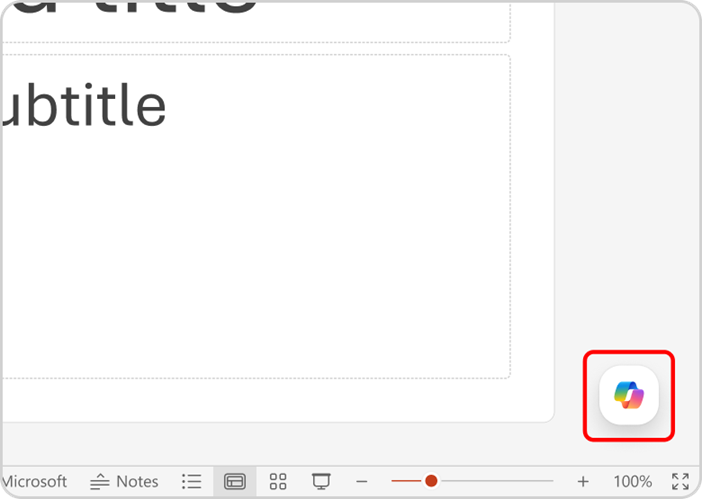
Creating presentations and adding slides with Copilot in PowerPoint will move from the Sparkle icon to Agent Mode in the Copilot chat pane across Windows, Web, and Mac by mid-April. Users will access this via the Copilot icon, select Agent Mode, and interact through chat to draft and refine presentations. Organizations should update training and notify users accordingly.
We are announcing the ability to create inputs from existing conversations in Microsoft Copilot Studio. This feature will reach general availability on March 31, 2026.
Microsoft 365 Copilot introduces a new Consecutive Interpretation mode in Teams, enabling structured turn-by-turn multilingual meetings. Available from March 2026, it requires a Copilot license, needs no admin setup, and suits interactive discussions like negotiations, enhancing interpretation accuracy and real-time alignment.
With this feature, users will be able to share their agent with a Microsoft Teams team. Users can search for and find teams in the agent sharing dialog box. Users can also send a notification to the main channel of that team to make members aware of an agent being shared with them, and as an easy way to install and start using the agent.
Users can use Copilot to create videos directly from the Clipchamp Start page. Turn a simple prompt or existing document into a polished video in minutes. Copilot will automatically draft a script, selects visuals, add narration, and assembles the video for you—no video editing experience required. Review, refine, and export your video quickly, all in one flow.More info: https://m365.cloud.microsoft/launch/Clipchamp/
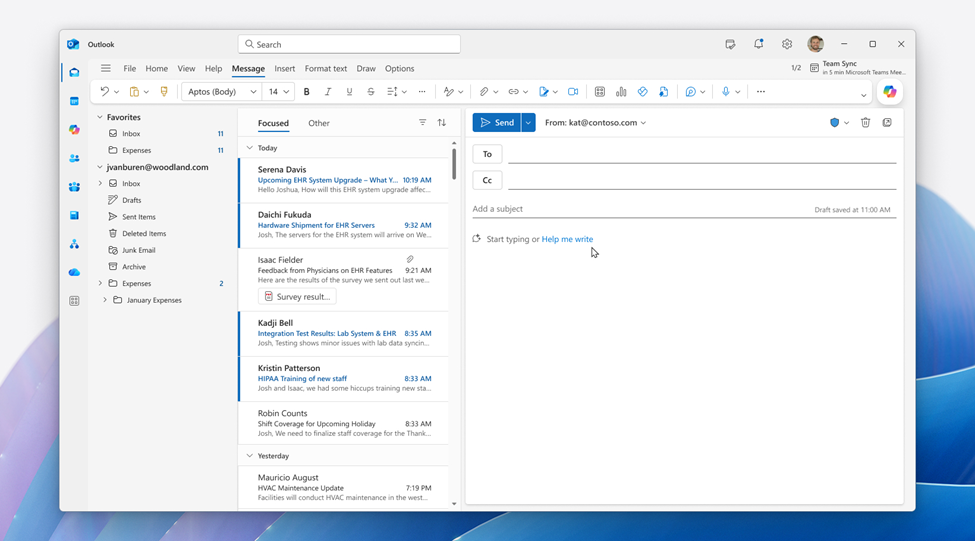
Microsoft 365 Copilot will be integrated into Outlook’s compose window starting March 2026, enabling real-time collaboration for email drafting. Available initially on Outlook web and new Windows Outlook, it is enabled by default for licensed users, with no changes to admin controls or workflows. No action required.
Copilot entry points in Word are being unified and moved to a consistent corner, with contextual access via selection floatie (Windows/Web) or right-click menu (Mac). Word Agent in the chat pane becomes the primary interface. Rollout starts March 2026, no admin changes required.






No comments yet