

 HANDS ON SharePoint
 HANDS ON Teams
 HANDS ON Lists
 HANDS ON tek
 M365 Admin
What’s new for Copilot – March 2026
March 2026 continued to push the boundaries of what AI can do across the Microsoft ecosystem. From productivity enhancements to deeper integrations, there was genuinely a lot to take in.
A few updates stood out to me as particularly impactful. First, the arrival of Anthropic Claude Sonnet as a selectable model within Microsoft 365 Copilot. On a similar note, the General Availability of Federated Copilot Connectors opens up some exciting possibilities, allowing Copilot to securely pull real-time data from third-party sources like Canva, HubSpot, and Google Calendar using MCP, without storing any of that data in Microsoft services. Finally, the new agentic email drafting experience in Outlook, where Copilot now works conversationally alongside you to draft, refine, and format emails.
Continue reading to know about everything that landed in March.
MAR
1
Copilot entry points in Word are being unified and moved to a consistent corner, with contextual access via selection floatie (Windows/Web) or right-click menu (Mac). Word Agent in the chat pane becomes the primary interface. Rollout starts March 2026, no admin changes required.
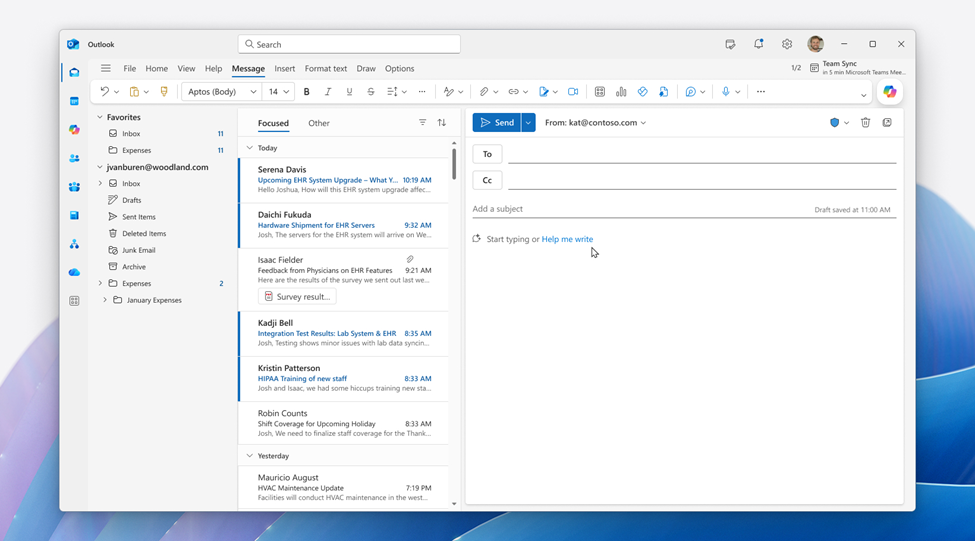
Microsoft 365 Copilot will be integrated into Outlook’s compose window starting March 2026, enabling real-time collaboration for email drafting. Available initially on Outlook web and new Windows Outlook, it is enabled by default for licensed users, with no changes to admin controls or workflows. No action required.
Users can use Copilot to create videos directly from the Clipchamp Start page. Turn a simple prompt or existing document into a polished video in minutes. Copilot will automatically draft a script, selects visuals, add narration, and assembles the video for you—no video editing experience required. Review, refine, and export your video quickly, all in one flow.More info: https://m365.cloud.microsoft/launch/Clipchamp/
With this feature, users will be able to share their agent with a Microsoft Teams team. Users can search for and find teams in the agent sharing dialog box. Users can also send a notification to the main channel of that team to make members aware of an agent being shared with them, and as an easy way to install and start using the agent.
MAR
3
You can now reference SharePoint libraries and OneDrive folders when creating a presentation with Copilot using Agent Mode in PowerPoint.
We are bringing a set of new Copilot metrics including actions taken in Microsoft 365 Copilot app, Edge and OneNote, and more key use cases across Outlook, Word, Excel, and PowerPoint including suggested reply, translate, coach, clean data and more. This will empower customers to more deeply understand the key Copilot adoption cases in Copilot Dashboard and Advanced Analysis in Viva Insights.
MAR
4
Copilot in Viva Glint now generates AI-powered summaries of employee survey results directly within Team Summary and Executive Summary reports, helping leaders quickly understand strengths, opportunities, and trends across their teams. Copilot Highlights surfaces key insights – such as notable score changes, benchmark comparisons, and response rate confidence – so leaders can move from data to action faster. With general availability, Copilot Highlights expands to support multilingual summaries, enabling global organizations to deliver AI-generated survey insights in their preferred language.
Once a Copilot Chat user has finished researching, creating, and collecting content in Copilot Pages, they can take it to a SharePoint News Post with the press of ‘SharePoint’ button under ‘Create’.
The Skills agent in Microsoft 365 Copilot will retire by the end of March 2026, with removal from new installations by March 16, 2026. Skills data is now integrated directly in Copilot and available via the Learning and Workforce Insights agents. Users should transition and reconfigure delegation accordingly.
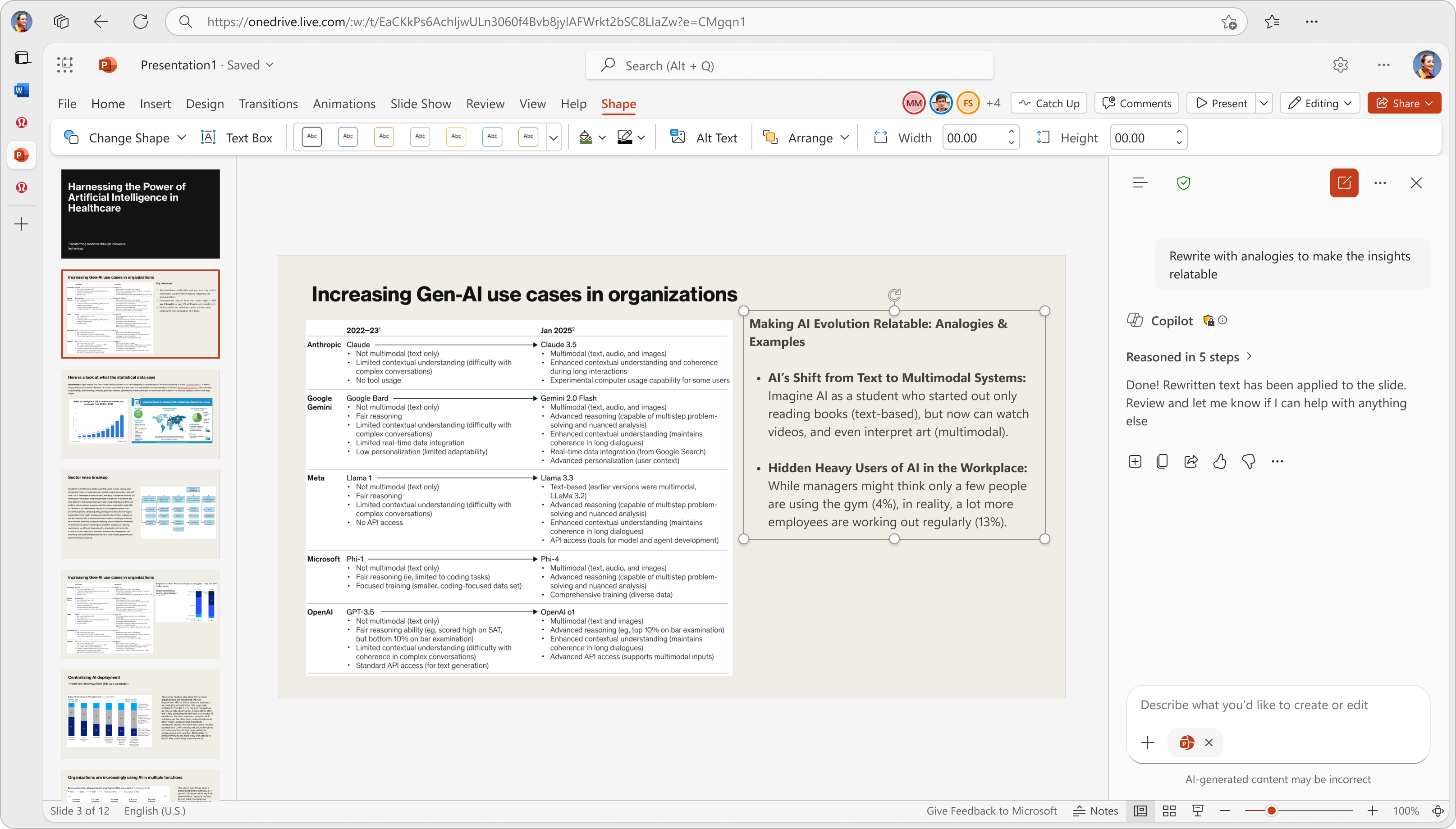
PowerPoint will update Microsoft 365 Copilot with Agent mode for rewrite, translate, and speaker notes features, enabling chat-based interaction directly on slides. Rollout starts mid-March 2026 for web, then Windows and Mac, completing by April end. No admin action required; features enabled by default for Copilot users.
MAR
5
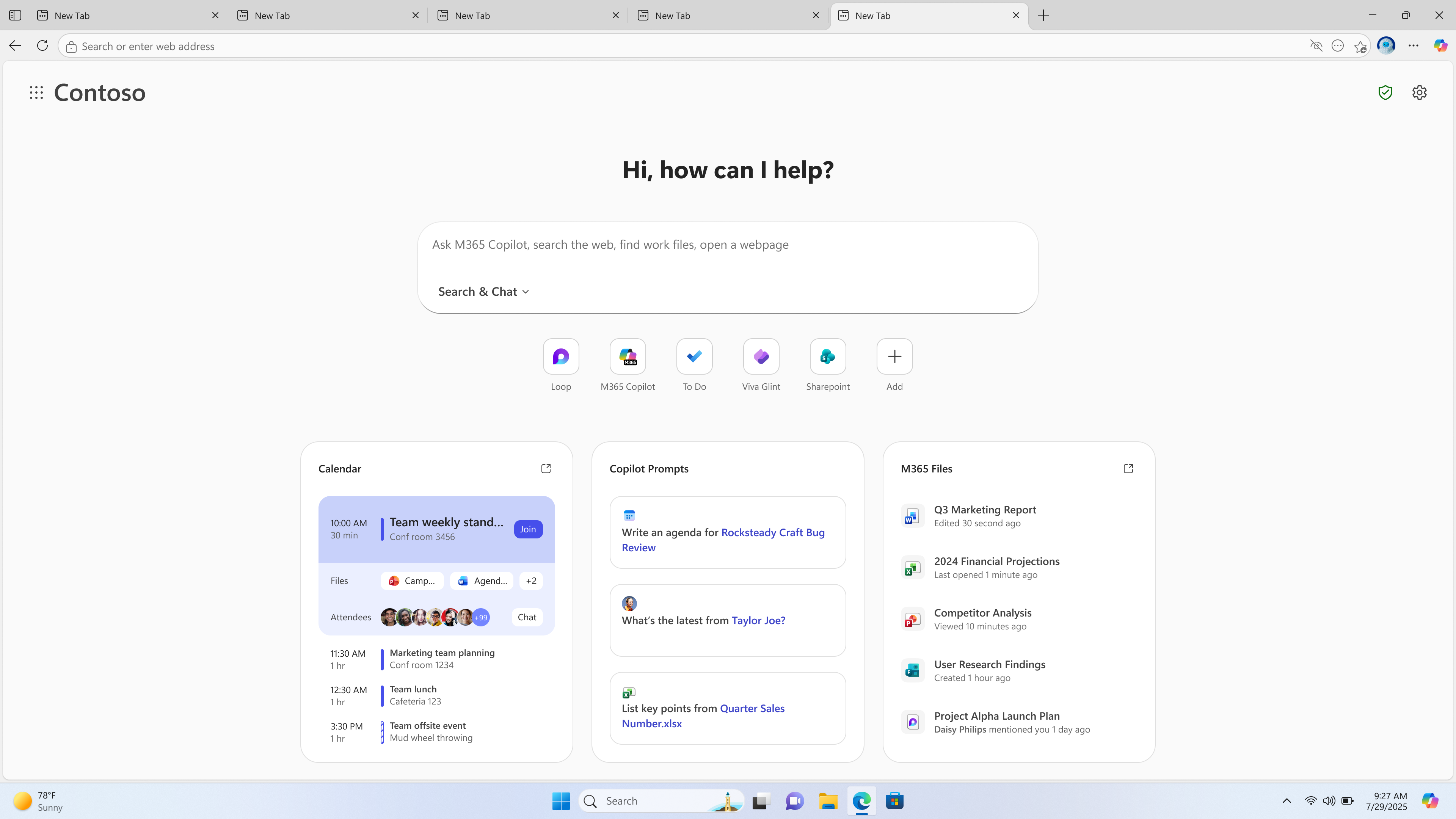
Search, chat, and explore the web from one search box with Copilot-suggested actions and curated work content to help your users get things done faster on the new, refreshed Copilot New Tab Page.
We are announcing the ability to automatically evaluate each user query and agent response during testing using the General Quality Grader in Microsoft Copilot Studio. This feature will reach general availability on March 31, 2026.
MAR
6
Give users a fast, built‑in way to capture screenshots and include them in Copilot prompts, helping them communicate visual context more easily and receive more accurate, actionable assistance.
Users will find updated layouts and text animations on video projects generated with Copilot.
We are announcing the ability to automatically evaluate each user query and agent response during testing using the General Quality Grader in Microsoft Copilot Studio. This feature will reach general availability on March 31, 2026.
The People agent in Frontier will retire in March 2026, with its key features integrated into core Microsoft 365 Copilot. No admin or user action is needed. Users can still use the People companion app and Org Explorer. Feedback via Frontier remains encouraged. No compliance issues identified.
MAR
9
Microsoft 365 Copilot, including Copilot Chat, will be available in Outlook shared and delegate mailboxes starting April 2026. Users with access and licenses can use Copilot features directly in these mailboxes without special prompts. Conversation history stays with the user’s primary account. No action required.
MAR
10
In Outlook, Copilot now works side by side with users to draft, refine, and format emails conversationally, powered by the same agentic capabilities available in Word, Excel, and PowerPoint.
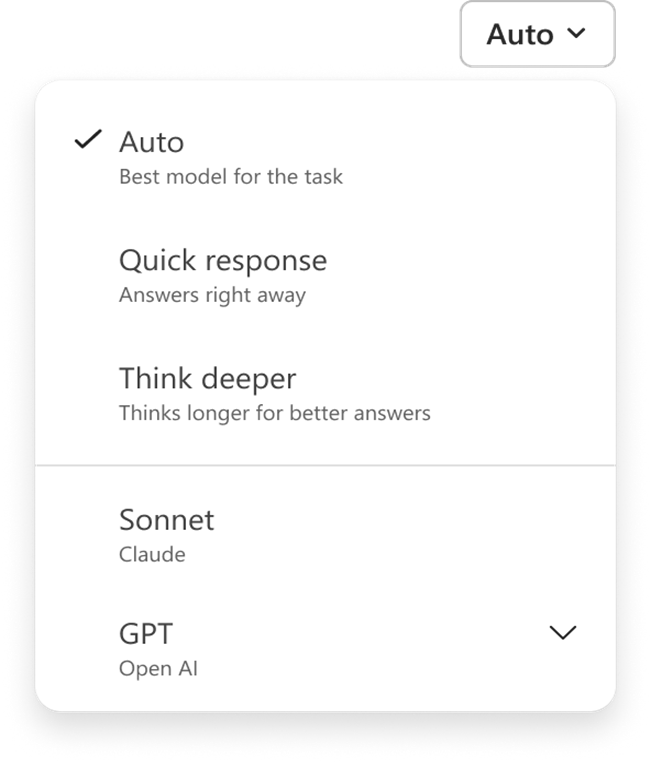
When create or edit a presentation with Copilot in PowerPoint, you can now select which model to use, including both Open AI and Anthropic models. Available to Microsoft 365 Copilot–licensed users.
Microsoft 365 Copilot Chat will enable drafting, editing, and sending Outlook emails directly within the chat on desktop starting early March 2026. This feature is on by default for licensed users with Exchange Online mailboxes, requires no admin changes, and maintains existing Outlook policies.

Anthropic Claude Sonnet is now available in Microsoft 365 Copilot for licensed users, except in EU/EFTA, UK, government, and sovereign clouds. It can be selected in Copilot Chat, with rollout completing by late March 2026. Admins may need to opt in where Anthropic is off by default.
Microsoft Viva Glint will introduce AI-generated Copilot highlights in survey reports by April 2026, providing structured summaries of key insights automatically for licensed users. No extra configuration or Microsoft 365 Copilot license is needed. Admins can manage access via the Microsoft 365 admin center.
MAR
11
You can choose to select Anthropic models, in addition to OpenAI models, when editing a Word document using Copilot.
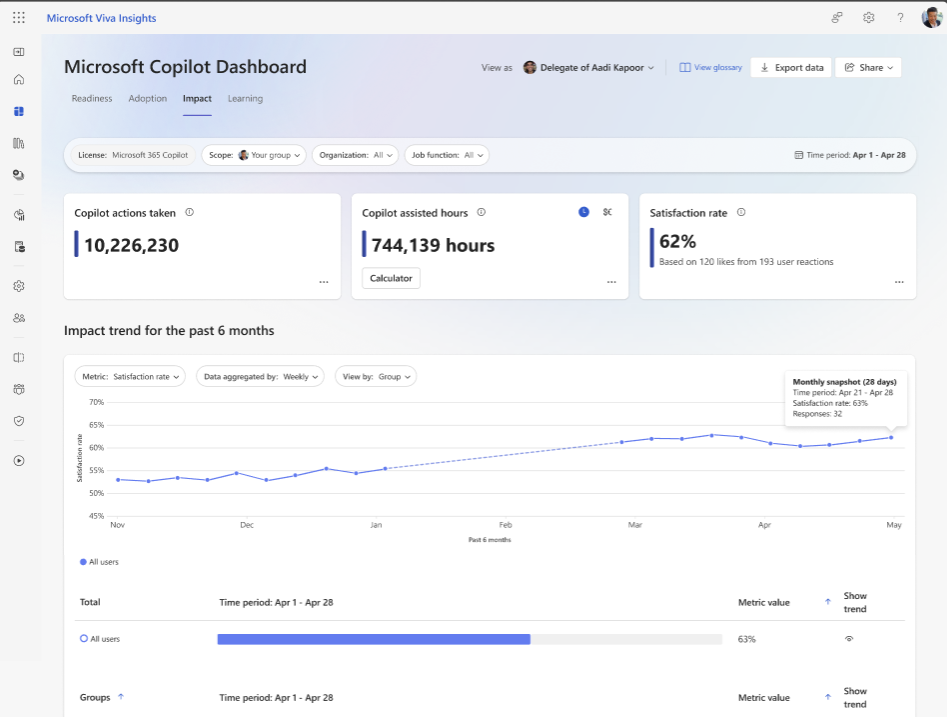
Microsoft 365 Copilot analytics dashboard will add a new satisfaction rate metric aggregating thumbs-up/down feedback from the past 28 days, visible in the Impact tab with filters. It rolls out worldwide March–April 2026, includes a 4-month data backfill, and requires no admin action.
MAR
12
We are announcing Microsoft 365 Copilot chat for canvas apps in Power Apps. This feature is now available for public preview.
MAR
13
Microsoft Edge for Business will introduce a Copilot-inspired new tab page combining search, chat, and work content in one box. Rollout starts mid-November 2025 (preview) and general availability in April 2026. Admins can enable it via Edge Management; users must opt in. No default changes or policy updates required.
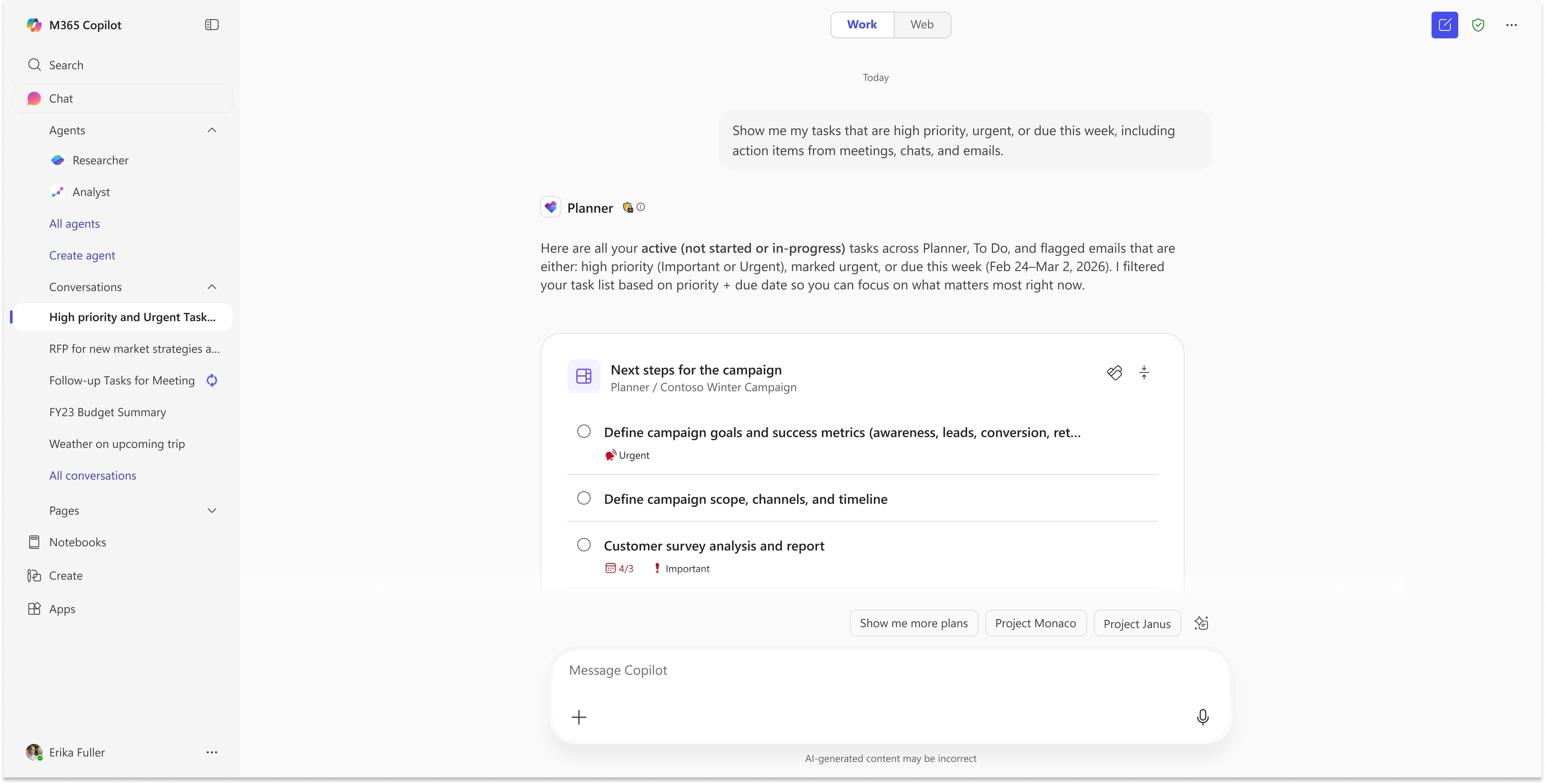
Starting mid-March 2026, Microsoft Planner’s Project Manager agent will be renamed Planner agent, with expanded availability to Microsoft 365 Copilot users on both Planner premium and basic plans. The update includes no functional changes, rolls out automatically, and enhances AI-powered task and status report capabilities.
MAR
16
Microsoft 365 Copilot Declarative Agents will upgrade to the GPT-5.2 model by late March 2026, enhancing quality, accuracy, and multi-step workflows. No configuration changes are needed; users should inform builders, validate key workflows, and monitor agent behavior. No compliance issues identified.
MAR
17
Use intelligent summaries in Copilot Dashboard to quickly surface what’s working and where targeted attention can accelerate Copilot adoption. Intelligent summaries highlight key adoption trends to focus on areas of success. Suggested prompts enable deeper exploration of underlying trends and drivers.
Microsoft 365 Copilot will support uploading .eml and .msg email files starting late February to March 2026, enabling users to provide email context for prompts. This feature is automatic, requires no admin setup, affects all Copilot users, and has no new compliance concerns.
MAR
18
Use intelligent summaries in Copilot Dashboard to quickly surface what’s working and where targeted attention can accelerate Copilot adoption. Intelligent summaries highlight key adoption trends to focus on areas of success. Suggested prompts enable deeper exploration of underlying trends and drivers.
New Copilot Notebooks features will launch in Frontier Public tenants starting March 23, 2026, including chat interactivity, study guides, SharePoint grounding, PowerPoint and Word agents, sharing to Microsoft 365 Groups, and Mind Maps. Features will become generally available by May 2026, enabled by default with no admin action required.
Microsoft 365 Copilot Pages will introduce admin-controlled AI-generated code previews, available only if Copilot Pages are enabled. Rolling out mid-March to mid-April 2026, admins can enable or disable this feature via a Cloud Policy. There are no new compliance or data processing impacts.
MAR
19
We are announcing the ability to assign the Analytics Viewer role to an agent, allowing agent owners to share an agent with a user as an analyst, granting limited read-only access to the analytics page in Microsoft Copilot Studio. This feature will reach general availability on March 31, 2026.
On March 18, 2026, we published the 2026 release wave 1 plans for Dynamics 365, Microsoft Power Platform, and Role-based Copilot offerings which is a compilation of new capabilities that will be released between April 2026 through September 2026. The new features and enhancements provide you with significant capabilities to help transform your business using our applications.
MAR
20
On March 18, 2026, we published the 2026 release wave 1 plans for Dynamics 365, Microsoft Power Platform, and Role-based Copilot offerings which is a compilation of new capabilities that will be released between April 2026 through September 2026. The new features and enhancements provide you with significant capabilities to help transform your business using our applications.
Designer tools in Copilot, rolling out from mid-February to early April 2026, provide users with enhanced controls to refine prompts and adjust visuals in image creation across Microsoft 365. Enabled by default, no admin changes are needed, and existing policies remain in effect.

Microsoft 365 Copilot’s Planner Agent is now available in Frontier, enabling users with Copilot licenses to create, update, and manage tasks and plans directly in Copilot chat. It offers intelligent insights, interactive task cards, and natural language prompts. Available now in Frontier; public preview starts mid-March 2026.
MAR
21
Copilot Notebooks allows users to generate Word documents using the content and references gathered in a notebook. Copilot drafts a structured document grounded in the notebook’s context, which can be opened and edited in Word, helping users move from ideas and source material to a ready‑to‑use document with fewer manual steps.
MAR
24
Create an interactive report, visualization, or dashboard using Copilot Pages. Copilot uses web data and the latest LLM models and can also ground responses in your Work data.
We are announcing the ability to use Microsoft 365 Copilot in model-driven apps in Power Apps. This feature will reach general availability on April 13, 2026.
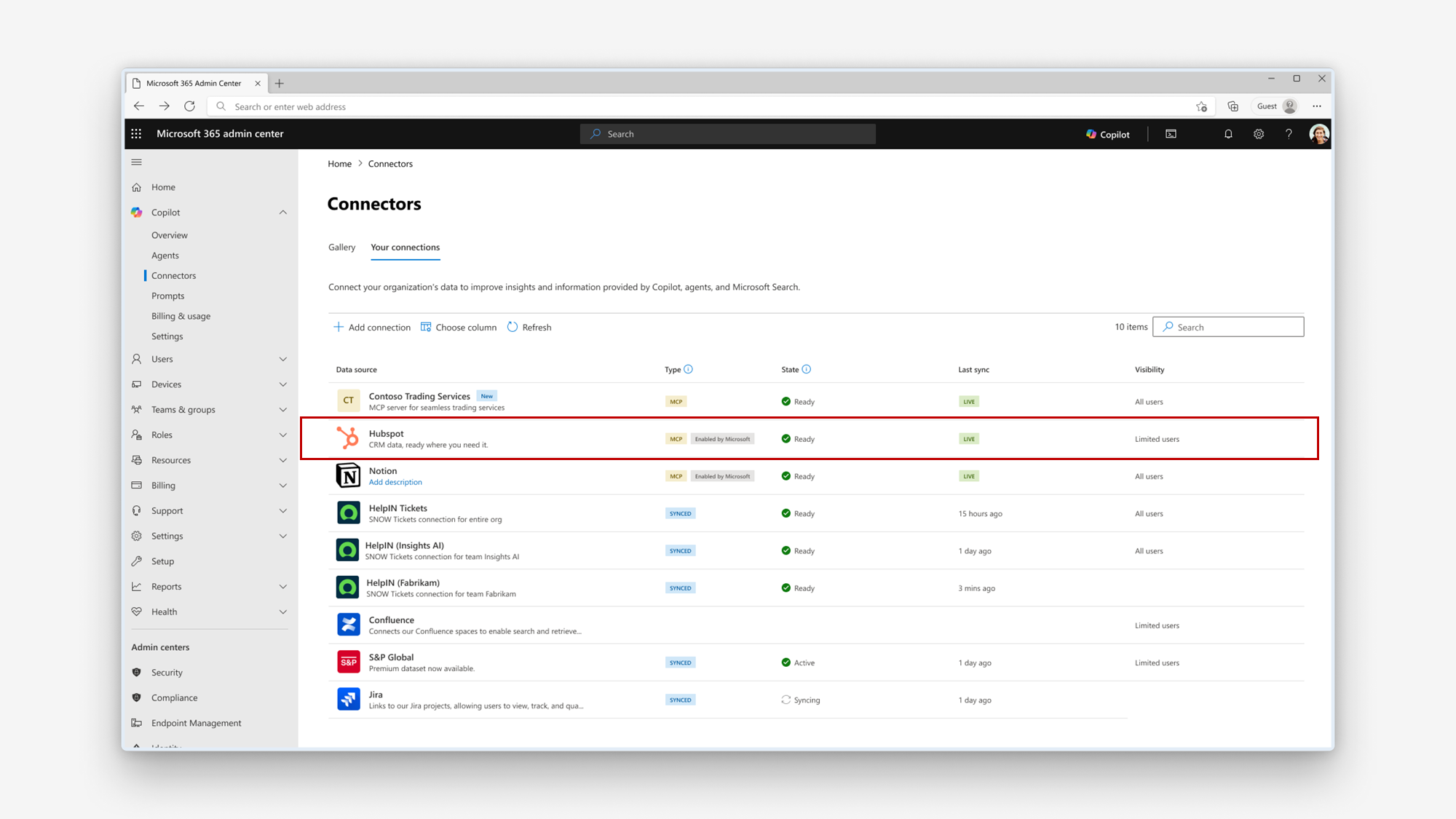
Microsoft 365 Copilot now supports federated Copilot connectors, enabling secure, real-time data access from third-party sources without storing data in Microsoft services. Available worldwide from April to May 2026, admins can manage connectors via the Microsoft 365 admin center, with initial connectors including Canva, HubSpot, and Google Calendar.
MAR
25
Mind Maps in Copilot Notebooks are interactive visual artifacts that help users understand notebook content through a grounded map of key topics, themes, and relationships. Users can explore the Mind Map, view summaries for individual nodes, and use Notebook chat to get more detail about a node. Available across OneNote and Microsoft 365 Copilot App.
Multimodal capture enables users to transcribe audio, take images, and type notes in a single session. Copilot then creates a structured Copilot Page with insights and user-captured content, saved to a user-selected Copilot Notebook. Designed for capturing offline work moments—including in-person conversations, whiteboard sessions, and personal notes. Other endpoints coming soon.
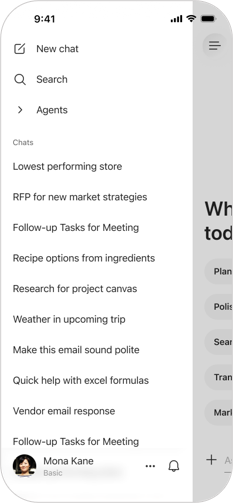
We are introducing a refreshed chat-first design in the Microsoft 365 Copilot mobile app, bringing a cleaner, more intuitive interface to users. This update includes a modernized design language, streamlined navigation, and other improvements that make it easier and faster for users to start, continue, and manage chats on the mobile app.
Microsoft Teams now provides audio announcements to PSTN participants when Copilot processes their audio in Copilot Only mode. This rollout is complete worldwide except GCCH and DoD (late June 2026). No admin action is needed; users may hear notifications when Copilot starts or stops processing audio.
Microsoft 365 Copilot and Workforce Insights agent will use the SupervisorIndicator attribute from MODIS to customize manager identification based on organizational HR definitions, improving accuracy in insights and analytics without changing reporting hierarchies or access controls. Rollout begins late March 2026.
MAR
26
Microsoft is announcing the General Availability (GA) of federated Copilot connectors for Microsoft 365 Copilot. Federated Copilot connectors enable users to securely connect Copilot to popular third‑party sources and retrieve data in real time using the Model Context Protocol (MCP). These connectors do not store or index customer data in Microsoft services; access occurs in real time using the user’s identity, while administrators retain full governance and control through the Microsoft 365 admin center. With GA, federated Copilot connectors will be supported in Researcher agent, Microsoft 365 Chat, and Agent Mode in Excel, enabling users to bring external data directly into their workflows.
We are announcing the Tool & Topic Invocation Grader in Microsoft Copilot Studio. This feature will reach general availability on March 31, 2026.
Security Copilot will be included with Microsoft 365 E5 via a phased rollout from April 20 to June 30, 2026, providing 400 Security Compute Units per 1,000 users and core agentic features across Microsoft security products. Additional advanced capabilities may incur extra costs.
MAR
27
Users can now view, edit and share Copilot Pages with Outlook for Android, making it easier to continue working with Copilot and colleagues while on the go.
See what Copilot can do the moment you preview a file in OneDrive or SharePoint. Ready-to-use prompts appear alongside the Copilot button, helping you summarize documents, generate FAQs, and more — all without writing a single prompt.
We are announcing the ability to analyze user sentiment from agent conversations in Microsoft Copilot Studio. This feature will reach general availability on March 31, 2026.
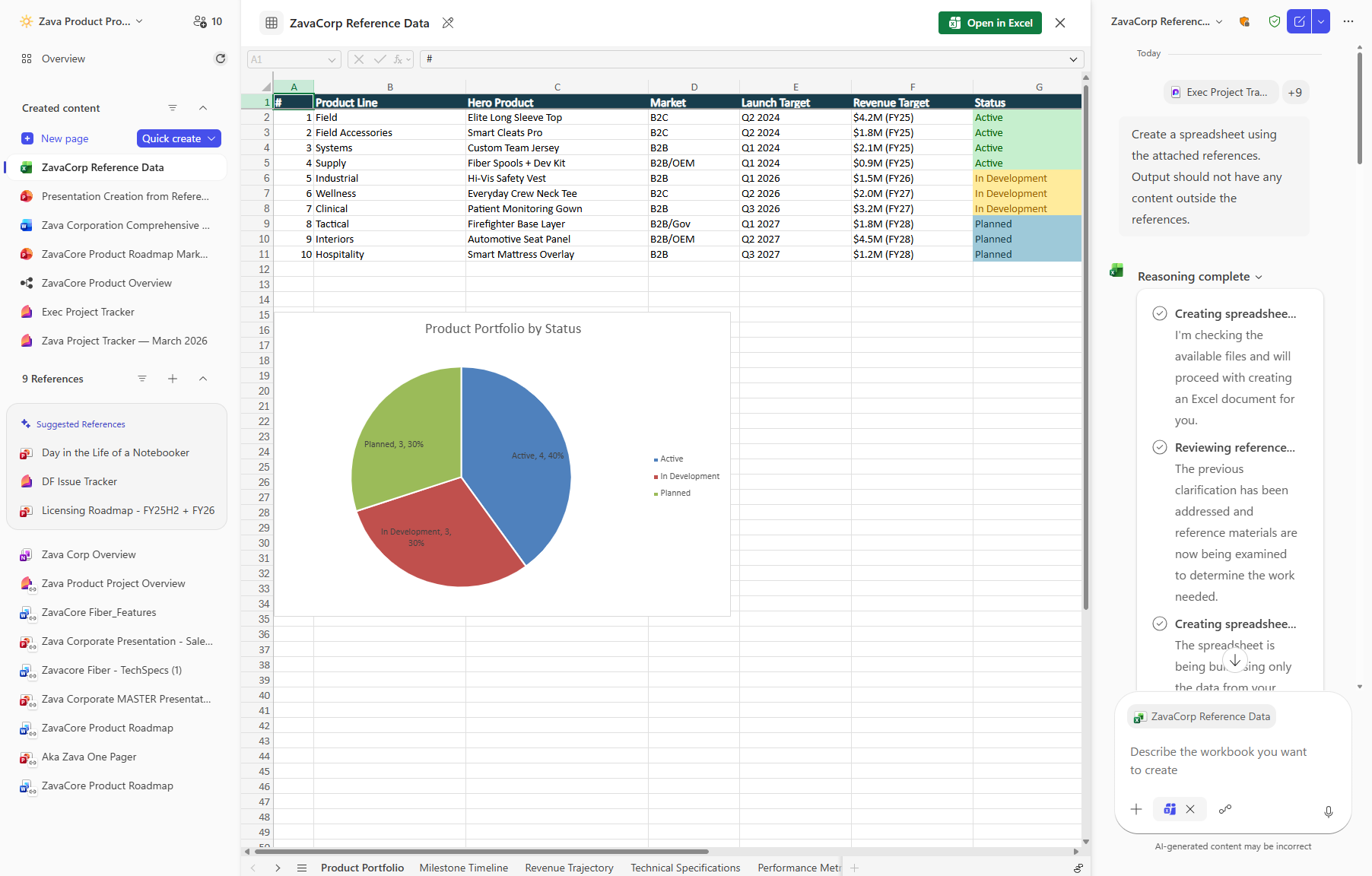
Copilot Notebooks will enable users with a Microsoft 365 Copilot (Premium) license to generate and edit Excel spreadsheets directly from notebook content. This feature rolls out in public preview from late March to April 2026 and general availability in late May 2026, with no admin action required.
Microsoft 365 Copilot will support custom license request policies by user group, enabling tailored guidance and routing aligned with internal approval workflows. Rolling out worldwide from late April to June 2026, admins can configure these policies in the Microsoft 365 admin center; existing setups remain unchanged unless updated.
MAR
30
The Copilot Dashboard adoption landing page will be updated to show a unified view of Copilot adoption across the organization. Instead of the default page showing only on Microsoft 365 Copilot (licensed) usage, the page will include all Copilot user adoption, covering both M365 Copilot and Copilot Chat usage that does not require a license. A License filter will allow users to switch between All, M365 Copilot (licensed), and Copilot Chat (unlicensed) views.
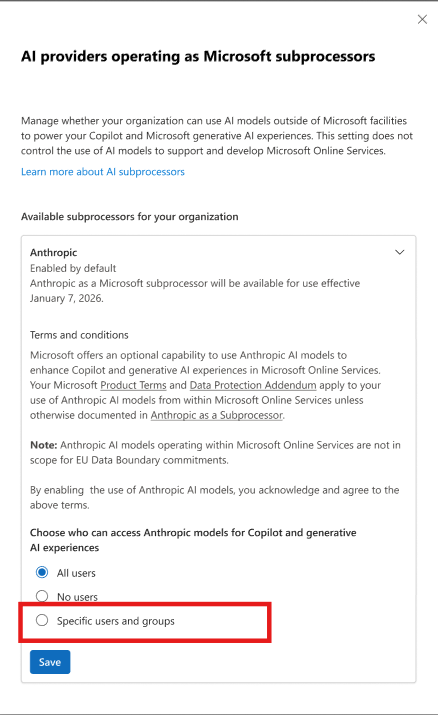
Admins will soon be able to assign third-party AI model providers like Anthropic and xAI to specific users or groups in Microsoft 365 Copilot via a new control in the Microsoft Admin Center. This rollout begins in late April 2026 and supports Entra ID group-based access management.
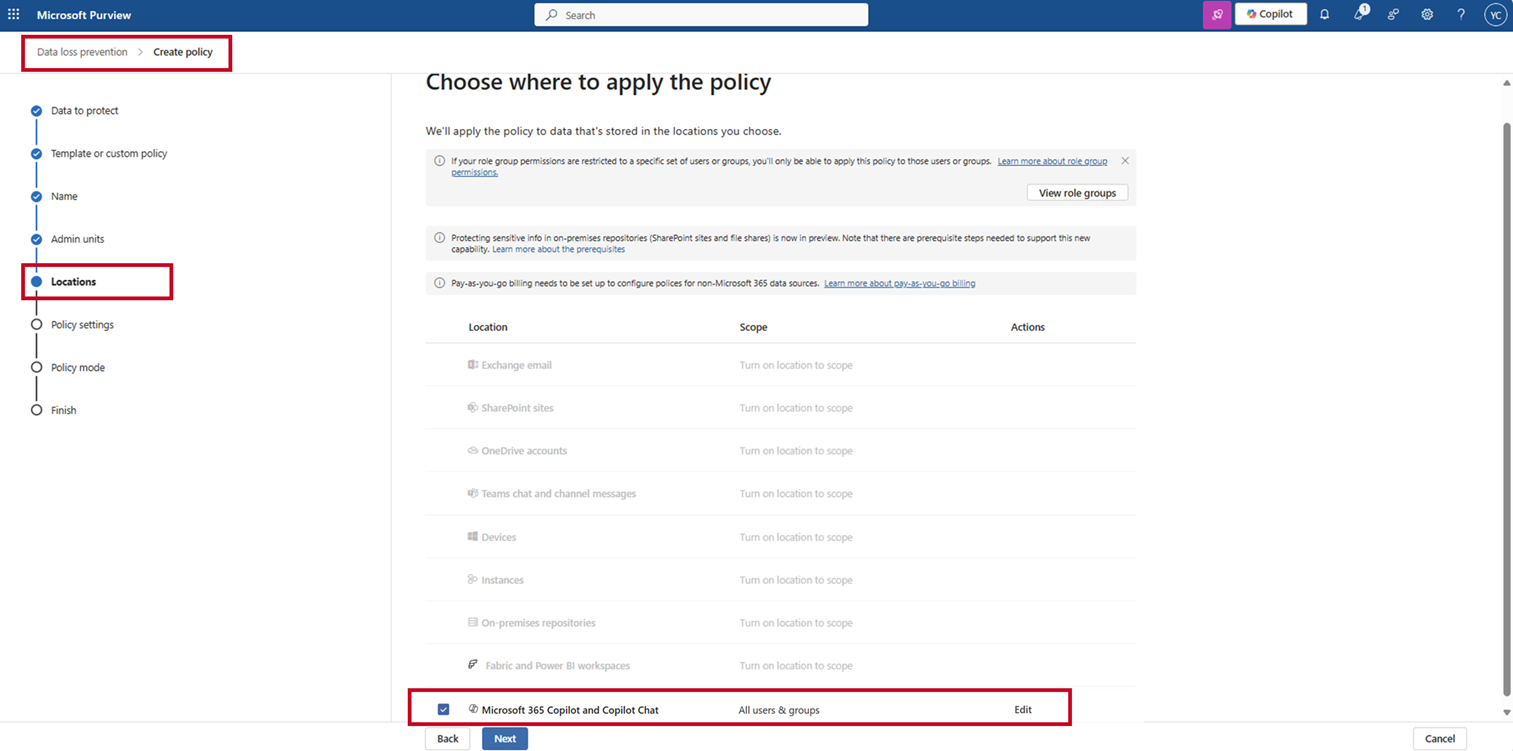
Microsoft Purview DLP will add real-time evaluation to block sensitive data in Microsoft 365 Copilot and Copilot Chat from external web searches. When blocked, Copilot uses internal Microsoft Graph data. Rollout begins late March 2026; admins must opt in by updating DLP policies in the Purview portal.
MAR
31
The Files companion app, part of the Microsoft 365 companion apps suite on the Windows taskbar, now surfaces AI-powered Copilot file prompts for users with a Microsoft 365 Copilot Chat starter license. Previously available only to premium Copilot licensees, this update extends contextual file prompts to starter license users, enabling them to discover and interact with relevant files through intelligent suggestions. Users can find their most relevant files faster and take action on them directly from the Files app.
Copilot Notebooks allows users to generate Excel spreadsheets using the content and references gathered in a notebook. Copilot drafts a structured spreadsheet grounded in the notebook’s context, which can be opened and edited in Excel, helping users move from ideas and source material to a ready‑to‑use spreadsheet with fewer manual steps.
Copilot now provides coaching feedback on email drafts via chat and can apply suggestions directly to your message in Outlook. Users have the option to choose which suggestions are applied, and Copilot updates your email in place.
We are announcing the ability to boost data-driven decision making using Visualize with Copilot in Dynamics 365 Sales. This feature will reach general availability on April 30, 2026.
We are announcing the ability to configure admin settings for meeting AI insights sharing governance in Microsoft 365 Copilot for Sales. This feature will reach general availability on April 30, 2026.
We are announcing the ability to control AI insights generation with meeting sensitivity labels in Microsoft 365 Copilot for Sales. This feature will reach general availability on April 30, 2026.
We are announcing the ability to boost engagement with Copilot-powered conversational text messages in Dynamics 365 Customer Insights – Journeys in conjunction with Dynamics 365 Contact Center. This feature will reach general availability on April 30, 2026.
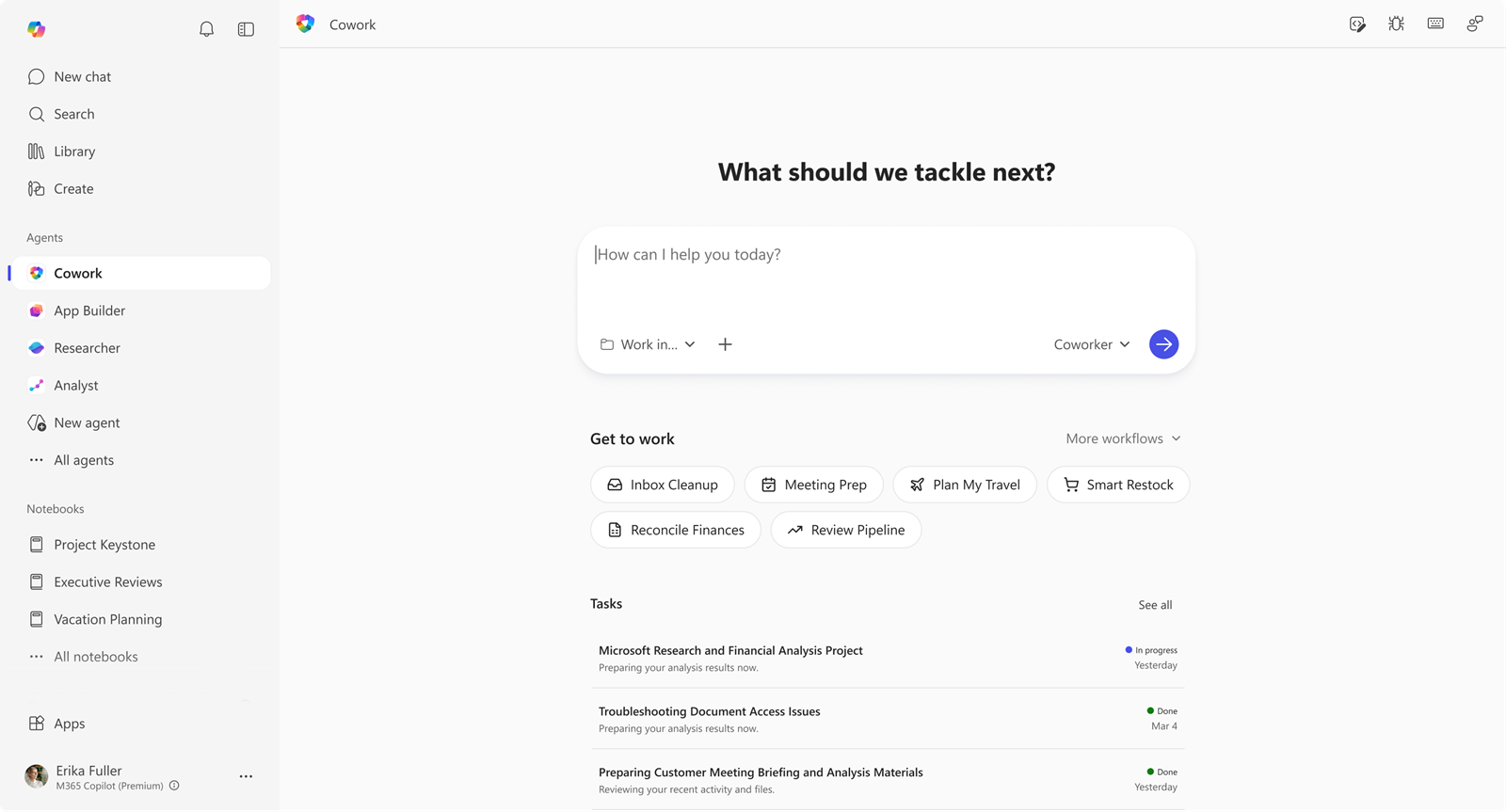
Copilot Cowork is now available in Frontier for Microsoft 365 Copilot Premium users, enabling multi-step task orchestration across apps with user approval and progress tracking. It requires Frontier enrollment, enabled agents, and Anthropic as a subprocessor. EU tenants must enable it explicitly due to data boundary rules.
Microsoft 365 Copilot mobile app will get a new chat-first design starting late April 2026, with updates to navigation, chat input, and voice interactions. The update is automatic, requires no admin action, and applies to all users on iOS and Android worldwide, enhancing usability without changing workflows.
New Microsoft 365 Copilot metrics will be added across apps like Edge, OneNote, Outlook, Word, Excel, and PowerPoint, enhancing usage insights in Copilot Dashboard and Analytics. Rolling out worldwide from late April to late May 2026, this feature is automatic for licensed users with no required configuration changes.






No comments yet