

 HANDS ON SharePoint
 HANDS ON Teams
 HANDS ON Lists
 HANDS ON tek
 M365 Admin
Hands-On Microsoft 365 Pulse – Weekly Updates (Week 16)
I’m writing this pulse update directly from Orlando, Florida, while I’m waiting for the Microsoft 365 Conference keynote to kick off, I’m speaking at the event this this week. Last week there were two highlights that really caught my eye, and I think they’re going to make a real difference for how people work with SharePoint.
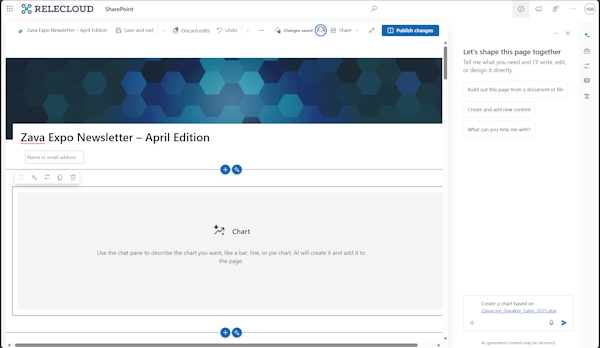
First up is the ability to create charts on pages with AI. SharePoint now has a new web part that uses AI to generate interactive charts from plain language prompts. Honestly, this is a game changer because creating charts on pages has always been a bit of a hassle. People usually grab screenshots from Excel or Power BI, or they try to embed whole apps just to show some data.

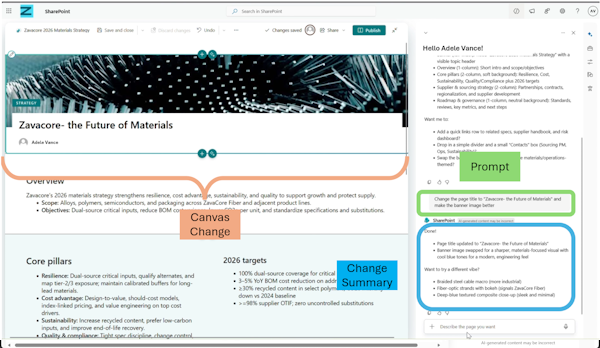
The second highlight is creating and editing SharePoint pages with Copilot. Building SharePoint pages from scratch can be tedious, and even with templates, you’re still limited in what you can start with. With Copilot now powering page creation, you can simply describe what you want in natural language, and it’ll generate or edit the content for you. It handles the web parts, layouts, everything, so you get a tailored starting point.
So if you’re here in Orlando and you’re reading this pulse update while you’re at the conference, ping me and let’s have a chat face to face. I’d love to hear what you think about these updates.
As always, there’s a bunch more to explore — check out the full list below. Let me know in the comments what your favorite update was this week, or what you’re hoping to see next. I’m curious to hear what caught your eye!
SharePoint
Create and edit SharePoint pages with Copilot-powered AI
Create charts on pages with AI in SharePoint
Excel
Excel: Plan Mode for Copilot in Excel
Copilot entry point changes in Excel
Microsoft 365 Apps
Updates available for Microsoft 365 Apps for all channels
Modernized Change Management for Microsoft 365
Message center post structure updates may require admin script changes
Organizational Data Export Capability for Tenant Admins
Microsoft 365 Copilot
Microsoft 365 Copilot: Discover Copilot actions in OneDrive/SharePoint file preview
Agent Builder in Microsoft 365 Copilot: Updates to the agent creation experience
Submit agent to the Agent Store from Agent Builder
Microsoft Copilot (Microsoft 365)
Microsoft Copilot Studio
Microsoft Copilot Studio – UPDATE – Classic agent creation experience in Teams
Microsoft Edge
Microsoft Entra
General Availability: Microsoft Entra passkeys on Windows
Microsoft Intune
Microsoft Intune In Development for April 2026 is now available
Microsoft Purview
Microsoft Purview: Migration tool in Unified Catalog to migrate classic glossary terms
Microsoft Purview for agents: AI observability and insider risk management now generally available
Microsoft Purview: Data Lifecycle Management- Azure PST Import
Microsoft Purview eDiscovery: Naming and description fields will restrict certain special characters
Microsoft Purview: Data Security Investigations – notification and improved search capabilities
Microsoft Purview: Data Security Investigations – Introducing new custom examination
Microsoft Purview: Insider Risk Management-AI app selection for Generative AI apps indicators
Microsoft Sentinel
Planned breaking changes to ASIM KQL functions used by Microsoft Sentinel for Developers
Microsoft Teams
Microsoft Teams: Profanity filter is disabled by default for captions
Expanded visibility for the Teams Reader role in the Teams admin center
Assign participants to breakout rooms using CSV import in Microsoft Teams meetings
Microsoft Teams: AI-powered notes for in-person meetings with Facilitator in Teams Rooms on Windows
Microsoft Teams: Breakout rooms in Teams events
Microsoft Teams: Report external users for security concerns in Teams
Microsoft Teams: Meeting toolbar redesigned
First channel in new Microsoft Teams will default to threaded conversation layout
Microsoft Teams admin center: Events license management for Attendee Capacity Pack licenses
Microsoft Teams: Meeting organizers can automatically start transcription without recording
Microsoft Viva
Microsoft Engage: More for you feed when opening posts
Microsoft Viva: Viva Glint – Copilot assisted commenting in Glint survey taking
Microsoft Viva: Viva Glint – Configure data retention policy for Viva Glint
OneDrive
OneDrive: Improved Shared file experience on mobile
OneDrive: Improved finding and browsing document libraries on iPhone and iPad
Outlook
Outlook: Account Selector in Outlook Copilot Side Pane
Outlook: Follow meetings in Outlook mobile
Outlook: Copilot in File Previewer for iOS
Outlook: ICS Preview experience
Outlook: Copilot now provides concise summaries with Outlook search results
Outlook: Save calendar events as .ics
Interim guidance for Egypt DST changes 2026
Power Apps
Power Apps – Supervise autonomous agents with agent feed
Power Apps – Enable online mode to access Dataverse for Canvas apps
Power Platform
Power Platform – Block sending customer data from Dataverse audit events to Purview Activity logging
PowerPoint
Use Copilot to explain selected slide content in PowerPoint Live
Remote Desktop
Remote Desktop adds new safeguards for connections opened from RDP files
Windows
The April 2026 Scan Cab is available
The April 2026 Windows security update is now available
Notice: The April 2026 Scan Cab for Microsoft updates is delayed
Take action: Out-of-band updates released for Windows Server to address two issues






No comments yet