

 HANDS ON SharePoint
 HANDS ON Teams
 HANDS ON Lists
 HANDS ON tek
 M365 Admin
Hands-On Microsoft 365 Pulse – Weekly Updates (Week 43)
Last week was busier than usual while I prepped CollabDays Portugal for the weekend—and it was a success. Microsoft 365 didn’t take a break, though. There’s a solid list of updates ready for you.
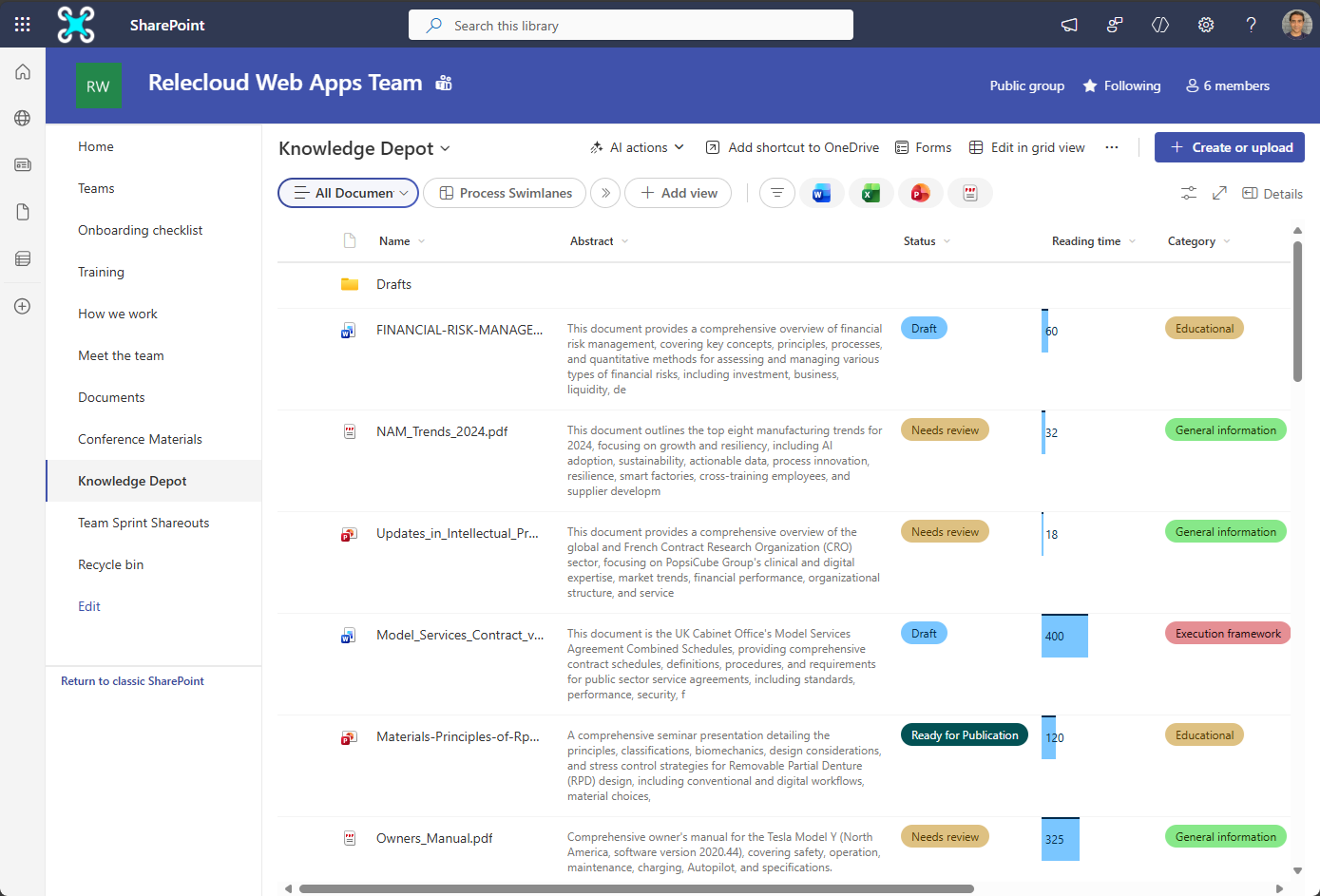
Heads‑up for November: SharePoint document libraries are getting a layout update. The view selector moves left, and the New button shifts to the right. After years with the opposite setup, I expect some confusion. Refresh your training materials and prepare your help content.
There’s more to cover—Copilot has a lot this week. Check the full list below and brief your users.
Microsoft Teams
Microsoft Teams: Live meetings indicator for channels
Microsoft Teams: Update user labels to show familiarity with external users
Microsoft Teams: Live meetings indicator for channels
Microsoft Teams: Apps in Private Channels for Microsoft Teams
Microsoft Teams: Discovery and Creation of Agentic Users from Teams and M365 Agent Store
Microsoft Teams: Interpreter agent support in Teams rooms on Windows
Microsoft Copilot (Microsoft 365)
Microsoft Copilot (Microsoft 365): App Navigation Pane Update
Microsoft Copilot (Microsoft 365): Copilot for PowerPoint will help you build your story’s narrative
Microsoft Copilot (Microsoft 365): Find Exactly What You Need, Faster
Microsoft Copilot (Microsoft 365): Customize AI-generated notes in meeting recap
Microsoft Copilot (Microsoft 365): Expanded Agent Support in Copilot Notebooks
Microsoft Copilot (Microsoft 365): Copilot voice support in Word & PowerPoint.
Microsoft Copilot (Microsoft 365): Copilot for PowerPoint will help your story’s narrative
Microsoft Copilot (Microsoft 365): Copilot for PowerPoint will help you build your story’s narrative
Microsoft Copilot (Microsoft 365): Quickly edit an image in PowerPoint
Microsoft Copilot (Microsoft 365): Microsoft 365 Copilot Integrates with Adobe Experience Manager
Microsoft Copilot (Microsoft 365): Enable Microsoft 365 Copilot Integration with SharePoint Server
Microsoft Copilot (Microsoft 365): Query Miro Visuals with Microsoft 365 Copilot Connectors
Microsoft Copilot (Microsoft 365): Query Structured Data via Copilot Connectors for PostgreSQL
Microsoft Copilot (Microsoft 365): Query GitLab Merge Requests and Content with Copilot
Microsoft Copilot (Microsoft 365): Query Coda Docs and Wikis with Copilot Connectors
Microsoft Exchange Online
Microsoft Exchange Online: Remove-DkimSigningConfig cmdlet now available to tenant admins
Microsoft 365 Admin Center
Microsoft 365 Admin Center Marketplace and Purchase Services node name change
Microsoft 365 Apps
Updates available for Microsoft 365 Apps for Current Channel
Power Automate
Planner
Planner: Task chat and mentions in basic plans
Microsoft Purview
Microsoft Purview: Data Security Investigations – Introducing new AI analysis capabilities
Microsoft Purview: Data Lifecycle Management-Auto-Archive for Exchange Online
Windows
How Windows 11 and AI are transforming the future of work
Take Action: Out-of-band update to address a vulnerability in Windows Server Update Services (WSUS)
An updated version of the October 2025 Scan Cab is available
Microsoft Viva
Microsoft Viva: Multilingual Support in Copilot for Viva Glint
Microsoft Viva: Copilot Analytics – Onboarding emails for Leaders
Microsoft 365 App
Microsoft 365 app: Graph API support for Working Hours and Location
Universal Print
Universal Print: Scan with Universal Print
Power Apps
Power Apps – Process maps as a part of your plan
Microsoft 365 Copilot
Microsoft 365 Copilot: Generate text for a PowerPoint slide using slide context
Microsoft 365 Copilot (web and mobile): Sharing Copilot Notebooks and mobile app rollout
Dynamics 365
Dynamics 365 Customer Insights – Journeys – Create an event portal on your own website using WebApp
Dynamics 365 Customer Service – Configure quality evaluation with quality evaluation agent
Microsoft PowerPoint
Microsoft PowerPoint: “Reuse Slides” feature will retire starting 2026
Microsoft Authenticator
Microsoft Authenticator app: Upcoming changes to jailbreak and root detection
Microsoft Intune
Microsoft Intune: Windows Backup for organizations in Intune
Microsoft Custom Engine Agents
Microsoft Custom engine agents: Introducing file upload support
SharePoint
Updated SharePoint document library user experience
Microsoft Defender for Identity
Microsoft Defender for Identity: Activate the Unified Sensor now generally available
Microsoft Defender for Identity: New recommendation added to Microsoft Secure Score
Outlook
Outlook: Support for Storing S/MIME Certificates in Contacts in New Outlook
Excel
Excel: Generate formulas directly in the grid with natural language
Prefer to get these updates delivered straight to your inbox?
Subscribe to the Hands-On Microsoft 365 Weekly Newsletter and never miss a thing: Subscribe here.






No comments yet